Payment Options for Business Customers
Get your bill conveniently, pay online via TrueBusiness iService, and receive an electronic receipt immediately after payment. No more worries about withholding tax deductions, just register for e-Bill, e-Tax, and make payment through TrueBusiness eService
1
Business customers with True as a withholding tax agent / or self-manage withholding tax payment
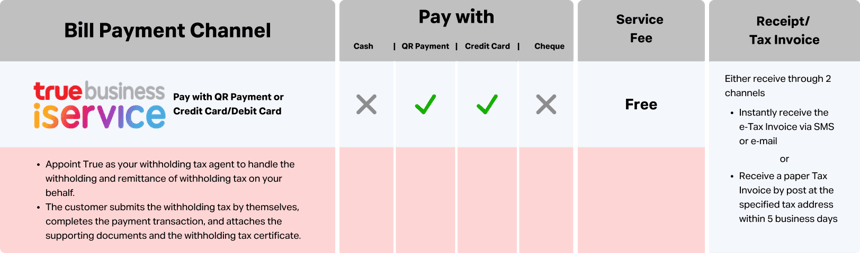
Pay viaTrueBusiness iService
1.Register for TrueBusiness iService
2. Select "Bills & Payment" menu and choose your payment method
2. Select "Bills & Payment" menu and choose your payment method
- Pay via PromptPay QR Code
- Pay via Credit/Debit Card
2.1 Paying via PromptPay QR Code
- Select the bills to pay (up to 50 bills, not exceeding 150,000 THB).
- Filter by product or search by branch name/branch ID or account name/account number.
- Tap Generate PromptPay QR Code, then scan the QR code to make a payment.
- Once payment is successful, the confirmation page will be displayed, and you can check your payment history.
2.2 Paying via Credit/Debit Card
- Select the bills to pay (up to 50 bills, not exceeding 25,000 THB). Accepted cards: VISA, MASTERCARD, and JCB.
- Filter by product or search by branch name/branch ID or account name/account number.
- Enter card details or save the card for future payment.
- Receive an e-Receipt/tax invoice instantly via SMS/email as an e-Tax invoice upon registration or within 5 business days by mail.
3. Receive an e-Receipt/tax invoice instantly via SMS/email as an e-Tax invoice upon registration or within 5 business days by mail.

Business customers who have appointed True or not appointed True forself-managing withholding tax payments.
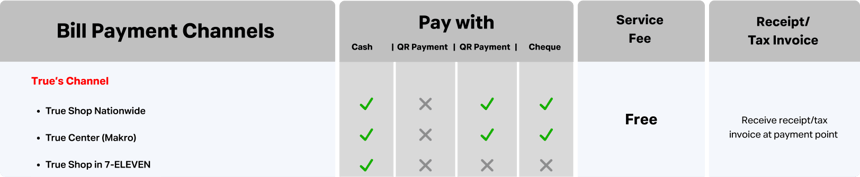
- Documents required:
- Invoice, Service number, or Customer ID
- Original withholding tax certificate
- Payment amount:
- If customers self-manage the withholding tax payment, pay the amount after tax withholding.
- If True is appointed to handle the withholding tax, pay the full amount as billed.
- You will receive your e-Receipt/tax invoice immediately.
2
Business customers who have appointed True for tax withholding & remittance
Find the nearest True Shop Click here
Available payment options for customers who have appointed True for tax withholding & remittance
Find the nearest True Shop Click here
Available payment options for customers who have appointed True for tax withholding & remittance
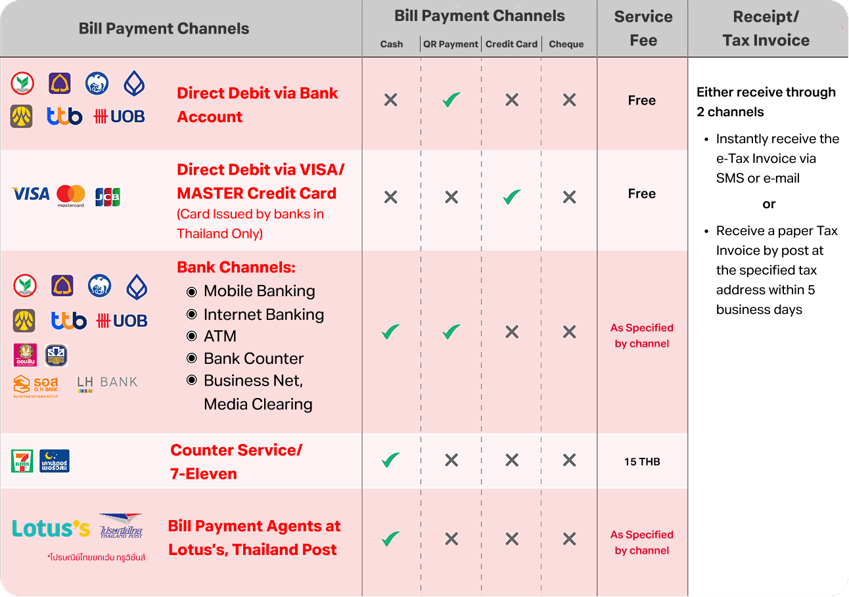
Auto payment via bank account or credit card
- Customers can request credit card auto-payment via TrueBusiness1239@truecorp.co.th To pay via bank account, visit any True Shop branch.
- The full invoice amount will be deducted from the bank account or credit card.
- e-Receipt/tax invoice will be sent instantly via SMS, email, or by postal mail within 5 business days.
Adjust TrueMove H Credit Limit
1
Download the form
Download the service request form Click here
2
Complete the form
- Company name
- Service number or Customer ID (can be viewed on the bill)
- Requested permanent credit limit adjustment for TrueMove H
- Authorized signature with company seal
3
Attach required documents
- Certified copies of the company registration certificate (signed on all pages).
- Certified copy of the authorized director's National ID, signed and stamped.
4
Submit via email
Send your form and documents to truebusiness1239@truecorp.co.th
Note: If your company has fewer than 3 billing cycles of payment history, please provide a company statement covering the last 3 months with an official stamp.
Transfer Ownership
1
Business-to-Business ownership transfer (Complete 2 forms before submission)
1. Download the service request form (Download here)
2. Download the 4 in 1 form (Download here)
3. Complete the forms and sign them with the authorized director's signature and company stamp.
4. Attach the following documents from both the current owner and the transferee:
2. Download the 4 in 1 form (Download here)
3. Complete the forms and sign them with the authorized director's signature and company stamp.
4. Attach the following documents from both the current owner and the transferee:
- Certified copies of the company registration certificate (signed on all pages).
- Certified copy of the authorized director's National ID with signature and company seal.
- For transferees only: Copy of VAT registration certificate (Phor. Por. 20), signed and stamped.
Note: If a representative is acting on behalf of the company, attach these extra documents:
- Power of attorney, signed by the authorized director (with a 10 THB stamp duty, or 30 THB for multiple transactions).
- A copy of the representative's National ID (signed for verification).
- The representative's original National ID when visiting a True Shop. (Find a branch)
2
Business-to-Individual ownership transfer (Complete 2 forms before submission)
1. Download the service request form (Download here)
2. Download the 4 in 1 form (Download here)
3. Complete the forms and sign them with the authorized director's signature and company stamp.
4. For the transferor (Company)attach the following:
2. Download the 4 in 1 form (Download here)
3. Complete the forms and sign them with the authorized director's signature and company stamp.
4. For the transferor (Company)attach the following:
- Certified copies of the company registration certificate (signed on all pages).
- Certified copy of the authorized director's National ID with signature and company seal.
- A copy of VAT registration certificate (Phor. Por. 20), signed and stamped.
Note: If a representative is acting on behalf of the company, attach these extra documents:
- Power of attorney, signed by the authorized director (with a 10 THB stamp duty, or 30 THB for multiple transactions).
- A copy of the representative's National ID (signed for verification).
- The representative's original National ID when visiting a True Shop. (Find a branch)
3
Individual-to-Business ownership transfer (Complete 2 forms before submission)
1. Download the service request form (Download here)
2. Download the 4 in 1 form (Download here)
3. Complete the forms and sign them with the authorized director's signature and company stamp.
4. For the transferor (Individual) attach the following:
2. Download the 4 in 1 form (Download here)
3. Complete the forms and sign them with the authorized director's signature and company stamp.
4. For the transferor (Individual) attach the following:
- Bring the original National ID and submit the documents at a True Shop. (Find a branch)
- Certified copies of the company or partnership registration certificate issued by the Ministry of Commerce, signed on all pages by an authorized director.
- Certified copy of the authorized director's National ID, signed and stamped.
- A copy of VAT registration certificate (Phor. Por. 20), signed and stamped.
Note: If a representative is acting on behalf of the company, attach these extra documents:
- Power of attorney, signed by the authorized director (with a 10 THB stamp duty, or 30 THB for multiple transactions).
- A copy of the representative's National ID (signed for verification).
- The representative's original National ID when visiting a True Shop. (Find a branch)
- (Is the transferee not allowed to delegate authority?)
Advantages of appointing True as your withholding tax agent:
To simplify monthly tax management and ensure full compliance with Revenue Department regulations, appoint True as your withholding tax agent.
✔ Reduce document preparation and monthly tax filing steps
✔ Save time and streamline operations
✔ Minimize withholding tax calculation and submission errors
✔ Ensure compliance with regulatory requirements
✔ Improve convenience and speed of service payments
✔ Save time and streamline operations
✔ Minimize withholding tax calculation and submission errors
✔ Ensure compliance with regulatory requirements
✔ Improve convenience and speed of service payments
Appoint True as a Withholding Tax Agent
1
Download the form
Download the Withholding Tax Agent Appointment Agreement by service type
TrueMove H, True Online , True Visions2
Fill out the form
Complete the appointment section, have it signed by an authorized director, apply the company seal, and attach the document detailing the request for payment of stamp duty in cash for electronic instruments (Form A.S.9)
- Example of filling out the “Withholding Tax Agent Appointment Agreement”. (Download here)
- Guidelines for requesting e-stamp duty (Form A.S.9) (Download here) and an example of the document detailing the request for payment of stamp duty in cash for electronic instruments. (Download here)
3
Submit via email
Send the application to truebusiness1239@truecorp.co.th
with the subject line: Application for Appointment of True as Withholding Tax Agent, including the Business ID, Taxpayer Identification Number, or Company Name.
with the subject line: Application for Appointment of True as Withholding Tax Agent, including the Business ID, Taxpayer Identification Number, or Company Name.
4
Bill Payment Channel
1
Business customers with True as a withholding tax agent / or self-manage withholding tax payment
Pay viaTrueBusiness iService
1.Register for TrueBusiness iService
2. Select "Bills & Payment" menu and choose your payment method
2. Select "Bills & Payment" menu and choose your payment method
- Pay via PromptPay QR Code
- Pay via Credit/Debit Card
2.1 Paying via PromptPay QR Code
- Select the bills to pay (up to 50 bills, not exceeding 150,000 THB).
- Filter by product or search by branch name/branch ID or account name/account number.
- Tap Generate PromptPay QR Code, then scan the QR code to make a payment.
- Once payment is successful, the confirmation page will be displayed, and you can check your payment history.
2.2 Paying via Credit/Debit Card
- Select the bills to pay (up to 50 bills, not exceeding 25,000 THB). Accepted cards: VISA, MASTERCARD, and JCB.
- Filter by product or search by branch name/branch ID or account name/account number.
- Enter card details or save the card for future payment.
- Receive an e-Receipt/tax invoice instantly via SMS/email as an e-Tax invoice upon registration or within 5 business days by mail.
3. Receive an e-Receipt/tax invoice instantly via SMS/email as an e-Tax invoice upon registration or within 5 business days by mail.
Business customers who have appointed True or not appointed True forself-managing withholding tax payments.
- Documents required:
- Invoice, Service number, or Customer ID
- Original withholding tax certificate
- Payment amount:
- If customers self-manage the withholding tax payment, pay the amount after tax withholding.
- If True is appointed to handle the withholding tax, pay the full amount as billed.
- You will receive your e-Receipt/tax invoice immediately.
2
Business customers who have appointed True for tax withholding & remittance
Find the nearest True Shop Click here
Available payment options for customers who have appointed True for tax withholding & remittance
Find the nearest True Shop Click here
Available payment options for customers who have appointed True for tax withholding & remittance
Auto payment via bank account or credit card
- Customers can request credit card auto-payment via TrueBusiness1239@truecorp.co.th To pay via bank account, visit any True Shop branch.
- The full invoice amount will be deducted from the bank account or credit card.
- e-Receipt/tax invoice will be sent instantly via SMS, email, or by postal mail within 5 business days.
Apply for Credit Card Auto Payment
1
Download the form
Download the "Credit Card Auto-Debit Authorization Form". (Download here)
2
Fill out the form
Fill in the required fields, sign with an authorized director's signature, and affix the company seal.
3
Submit via email
Send your form and documents to truebusiness1239@truecorp.co.th
Apply for Payment via Bank Account
1
Download the Appointment Form
Download the "Authorization and Power of Attorney for Withholding Tax Submission". (Download here)
2
Fill out the form
Complete the "Authorization and Power of Attorney for Withholding Tax Submission", have it signed by an authorized director, apply the company seal, and attach a 30 THB stamp duty.
3
Download the Consent Form
Download the "Bank Account Debit Authorization Form" (Download here) for approval by the bank.
Submit these documents to the bank:
Submit these documents to the bank:
- A copy of the company's bank account passbook, signed and sealed by the authorized director.
- A copy of VAT registration certificate or Phor. Por. 20 (only if there's a change in the Tax ID or company address).
- Certified copies of the company registration certificate (signed on all pages).
- A copy of authorized director's National ID, along with the original for verification (if handling the process in person).
4
Submit the documents
Submit the completed form and signed bank-approved documents at a True Shop. (Find a branch)
Note: If a representative is acting on behalf of the company, attach these extra documents:
- Power of attorney, signed by the authorized director (with a 10 THB stamp duty).
- A certified copy of the authorized director's National ID.
- A certified copy of the authorized representative's National ID.
Request a Replacement SIM for Damaged or Lost SIM Card (Swap SIM)
Prepare the documents to request a replacement SIM for a damaged or lost SIM with your original number (Swap SIM) as follows:
1
Submit In-Person
When the authorized director submits the request in person, the required documents are:
- A copy of the company's certificate, signed and sealed by the authorized director.
- The original National ID of the authorized director, with a certified true copy signature.
2
Power of Attorney (If not submitting in person)
If the authorized director is not submitting the request in person (delegated authority), the required documents are:
- A copy of the company's certificate, signed and sealed by the authorized director.
- The original National ID of the authorized director, with a certified true copy signature.
- A power of attorney, affized with a 10 THB stamp duty, signed and sealed by the authorized director.
- The original National ID of the authorized representative, certified as a true copy.
3
Submit the documents
Submit the required documents at a True Shop. (Find a branch)